Find the posts worth repeating
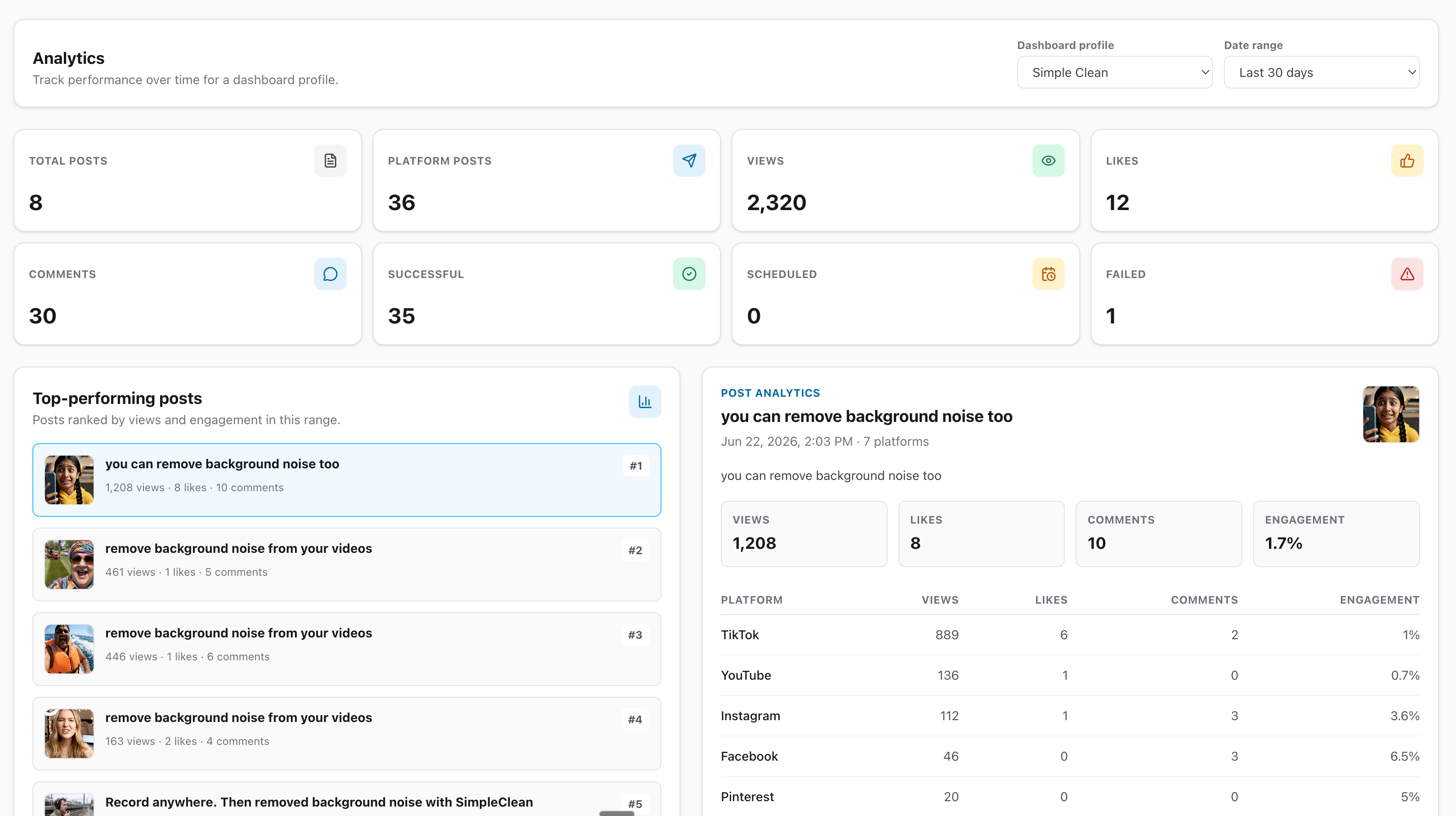
Rank posts by views and engagement, then open each result to see which platforms contributed to its performance.
Bring your social media performance into one clear dashboard. Compare platforms, find your highest-performing posts and formats, and use real engagement data to decide what to publish next.
Trusted by creators, founders and developers






Integrates with the tools you already use




Mallary organizes the numbers around the questions that matter: what worked, where it worked, and what deserves another iteration.
Rank posts by views and engagement, then open each result to see which platforms contributed to its performance.
Compare views and engagement across connected channels without switching between separate native analytics dashboards.
See whether videos, photos, carousels, Reels, Shorts, Stories, or other post options are producing stronger results.
Official platform partners


Start with a clear summary, explore individual winners, and compare the channels and content choices shaping your results.
See total posts, platform posts, views, likes, comments, and publishing outcomes as soon as you open the dashboard.
Open your highest-performing posts to compare views, likes, comments, and engagement for every connected destination.
Compare the latest views, likes, and comments for posts published across the last 7, 30, or 90 days.
Keep successful, scheduled, processing, and failed platform posts visible alongside the performance they produced.
Compare post options and average views across video, photo, mixed-media, and text or link content.
Quickly identify the platform, post option, and media format generating your strongest results in the selected range.
Switch dashboard profiles and review a consistent 7, 30, or 90-day window. You get a cleaner comparison without mixing unrelated accounts or campaigns together.
Start measuring your contentPublish through Mallary so each platform result stays connected to the original post and dashboard profile.
Review the last 7, 30, or 90 days and open the posts that deserve a closer look.
Use platform, format, media, and engagement patterns to decide what belongs in your next content plan.
Compare supported performance data for the channels where your audience already follows you.
 Facebook analytics
 Instagram analytics
 Threads analytics
 X analytics
 LinkedIn analytics
 Pinterest analytics
 YouTube analytics
 TikTok analytics
Metric availability, refresh timing, and historical depth depend on the destination platform, post type, permissions, and what the platform API makes available.
Retrieve the latest per-platform analytics snapshots for recent posts or one specific post when you need custom reporting, exports, automations, or agent access.
API Docscurl --request GET \
--url 'https://mallary.ai/api/v1/analytics?post_id=123' \
--header 'Authorization: Bearer YOUR_API_KEY'What to expect before you turn performance data into your next content decision.
The dashboard shows post totals, platform posts, views, likes, comments, engagement rates, publishing outcomes, top-performing posts, performance by posting date, and comparisons by platform, post option, and media format.
Yes. Choose one dashboard profile and review the last 7, 30, or 90 days. Each profile stays focused on the social accounts and posts grouped under that profile.
Mallary collects supported analytics for Facebook, Instagram, Threads, X, LinkedIn, Pinterest, YouTube, and TikTok. Metric availability and depth vary according to what each platform exposes for a post and connection.
No. Mallary refreshes analytics automatically on a schedule. Newer posts are checked more frequently, while older posts are refreshed less often, so the dashboard is designed for periodic performance reporting rather than second-by-second monitoring.
Analytics are included with Starter, Pro, and Business plans. Every paid plan can be tried free for 14 days, with no commitment and the option to cancel anytime.
Yes. The Mallary analytics API returns the latest available per-platform snapshots for recent posts or a specific post, including non-default dashboard profiles when you provide a profile ID.

"I automated the posting on 5 different platforms in under 20 minutes. Highly recommend!"

"I was totally confused by the official TikTok API. Mallary made it simple. Using it every day."

"OAuth management is usually a nightmare. Mallary abstracted that away completely."
Publish, measure, and learn from every connected channel in one social media analytics dashboard.